
How to Build a WhatsApp Chatbot in 2026 (No Coding Required)
Build a WhatsApp chatbot that replies to clients, schedules appointments, and handles Google Calendar — without writing a single line of code. Step-by-step guide with copy-paste skills.
Every guide about building a WhatsApp chatbot assumes you are a developer. They start with Docker, GCP firewall rules, and a Python virtual environment. That is fine if you enjoy that sort of thing — but most business owners just want their phone to stop buzzing at 11 pm.
This guide is for the other person: the freelancer, the small shop owner, the solo founder who gets 40 WhatsApp messages a day and needs them handled automatically. No servers. No code. No cloud console.
Watch the full walkthrough
Two ways to build a WhatsApp chatbot
There are two realistic options. One is for developers who want full control. The other is for everyone else.
| Approach | Who it is for | Setup time | Monthly cost |
|---|---|---|---|
| Self-hosted (Baileys, Docker, VPS) | Backend developers | 1–3 days | $10–$30 |
| BotFast — no-code SaaS | Business owners and founders | 30 seconds | $9+ |
If you are a developer who wants to self-host, freeCodeCamp covers that path well. This guide focuses entirely on the no-code route.
How to set up a WhatsApp chatbot in 5 steps (no coding)
Step 1 — Enter your WhatsApp number
Go to botfast.co and type your WhatsApp number with the country code (for example +8801712345678). Click Get my bot. The site generates a unique QR code tied to your account — no account creation, no form to fill out.
Which number? Use the personal or business WhatsApp number your clients already message you on. They keep texting the same number — nothing changes on their end.
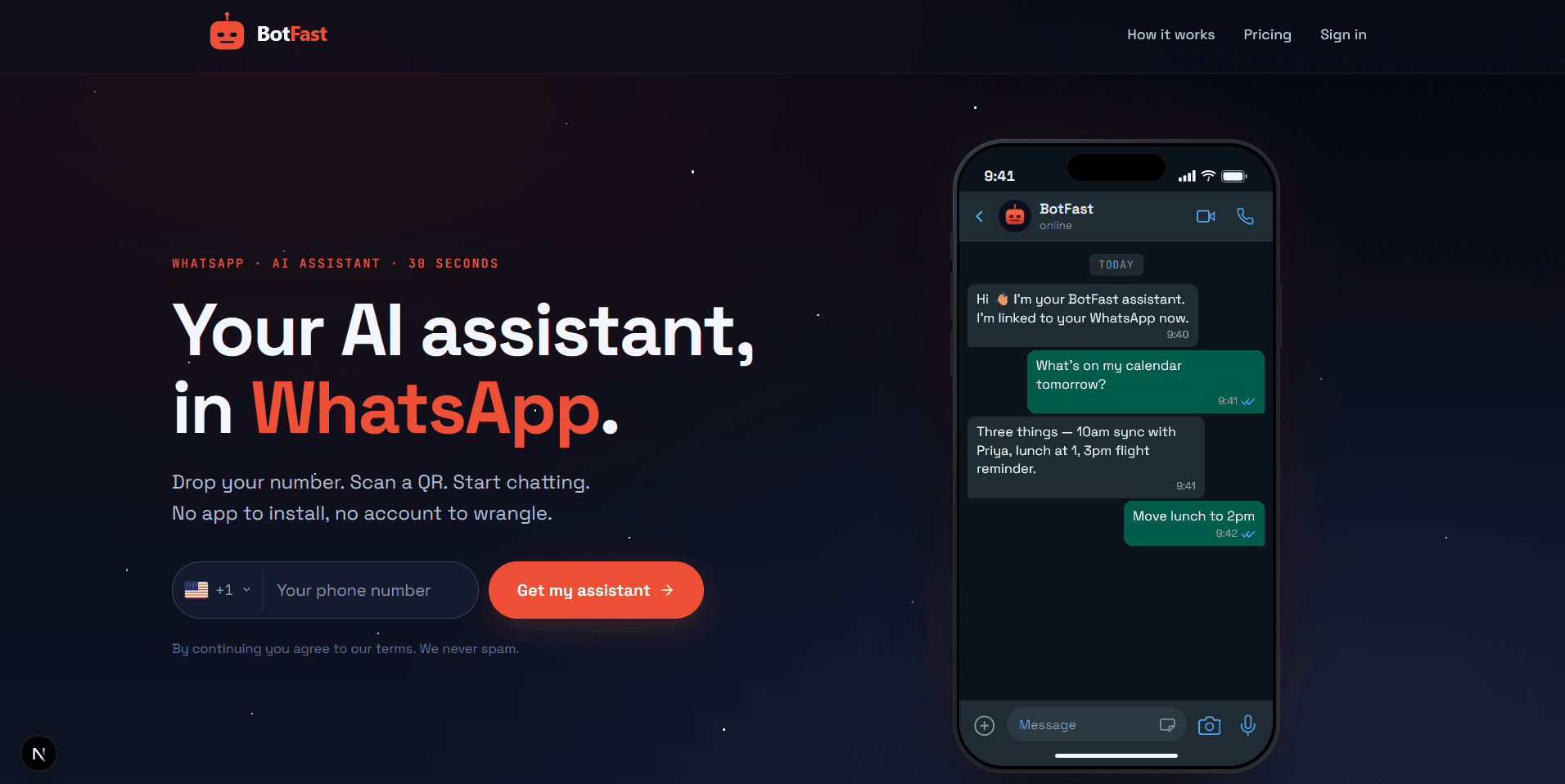
Enter your number on the BotFast homepage — a QR code appears instantly
Step 2 — Scan the QR code in WhatsApp
On your phone, open WhatsApp and tap the three dots (or Settings on iPhone) then Linked devices then Link a device. Point the camera at the QR code on screen. It links in under 5 seconds.
This uses WhatsApp's official linked-device feature — the same one behind WhatsApp Web. Your messages stay end-to-end encrypted. The bot shows up as a linked device inside your WhatsApp settings.
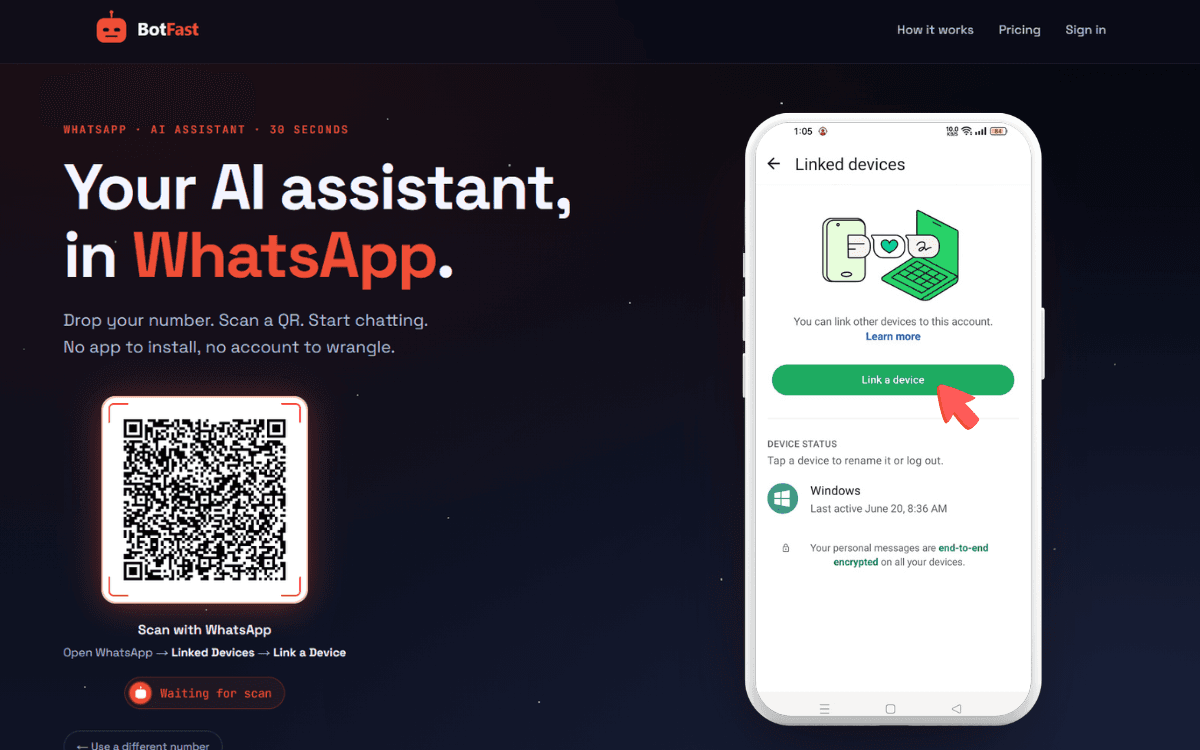
Scan the QR code from WhatsApp → Linked Devices → Link a device
Step 3 — Open your self-chat and talk to your bot
This is the part that surprises most people. Your control panel is not a dashboard — it is a WhatsApp chat with your own number. Open WhatsApp, find the conversation with yourself, and start typing instructions.
Try: "Reply to all client messages in English and tell them I will respond within 2 hours."
The bot reads that as a skill — a standing instruction it follows every time a client messages you. Write these in plain English, like briefing a new assistant.
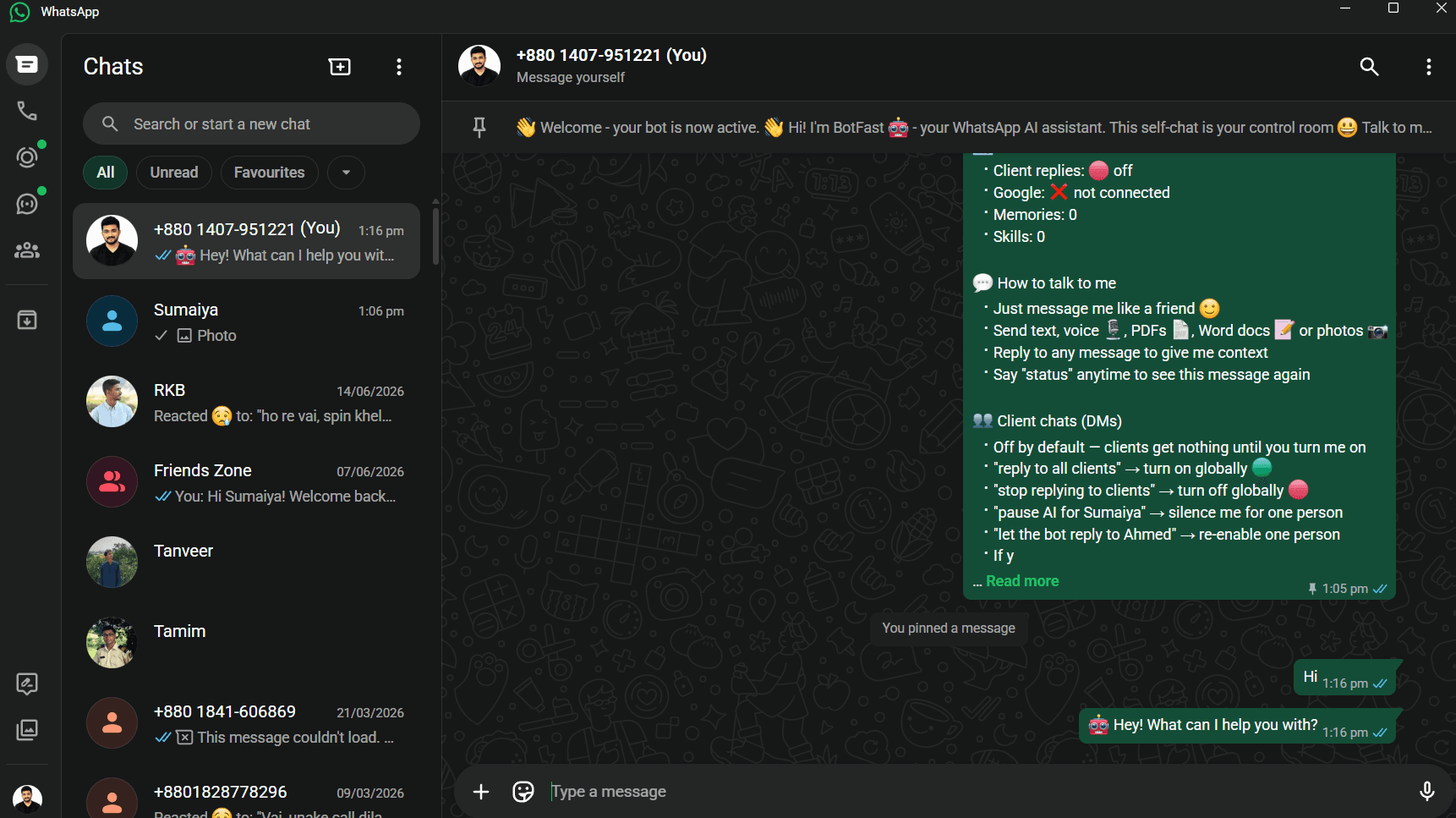
Chat with your own number to configure the bot — no dashboard required
Step 4 — Add skills for common situations
Skills are what make your bot useful beyond a basic auto-reply. Each skill is a short instruction the bot follows when a matching situation comes up. Here are some examples you can type directly into the chat:
- "When someone asks about my pricing, send them the link to botfast.co/pricing."
- "When Ahmed messages me, greet him by name and ask if he needs the monthly report."
- "When anyone asks about delivery times, say 3 to 5 business days and offer to send a tracking update."
You can have as many skills as you want — scoped to all clients, a specific contact, or a specific WhatsApp group.
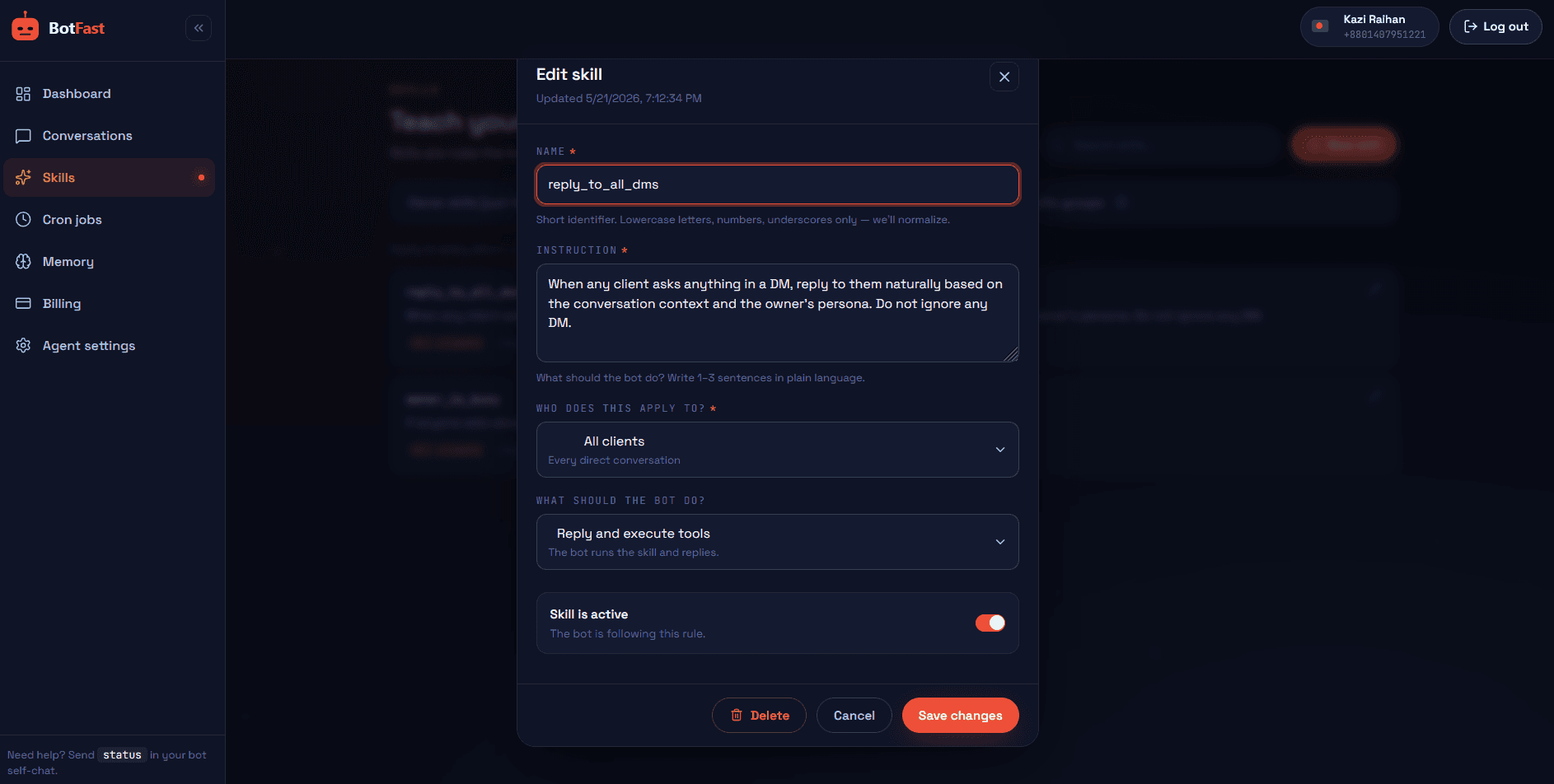
Add skills by typing instructions — the bot follows them on every matching message
Step 5 (optional) — Connect Google Workspace
If you want your bot to do more than reply — like booking appointments or reading your inbox — connect Google. Type "connect my Google" in your self-chat and tap the OAuth link. Once linked, you can say things like:
- "Schedule a call with Sarah tomorrow at 3 pm."
- "What emails did I get from clients today?"
- "Save this PDF to my Drive folder called Client Contracts."
The bot executes those as real actions — not just words. It uses your Gmail, Calendar, Drive, Sheets, and Docs directly.
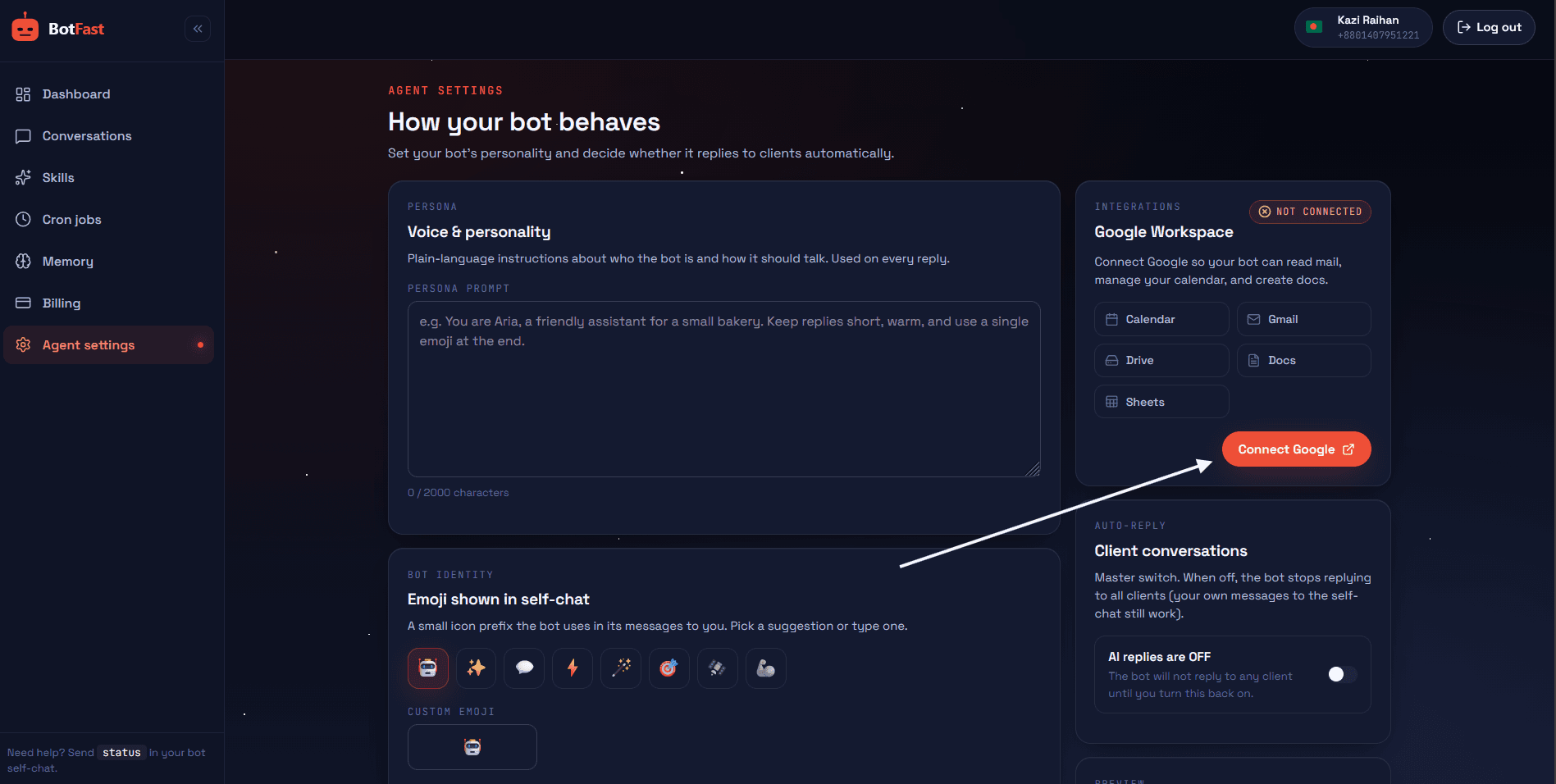
Connect Gmail, Calendar, and Drive with one OAuth tap
Manage everything from the dashboard
Everything you configure in WhatsApp is also available in the BotFast dashboard at botfast.co/dashboard. It is a visual control panel where you can review conversations, manage skills, schedule jobs, and track your credit usage — all in one place.
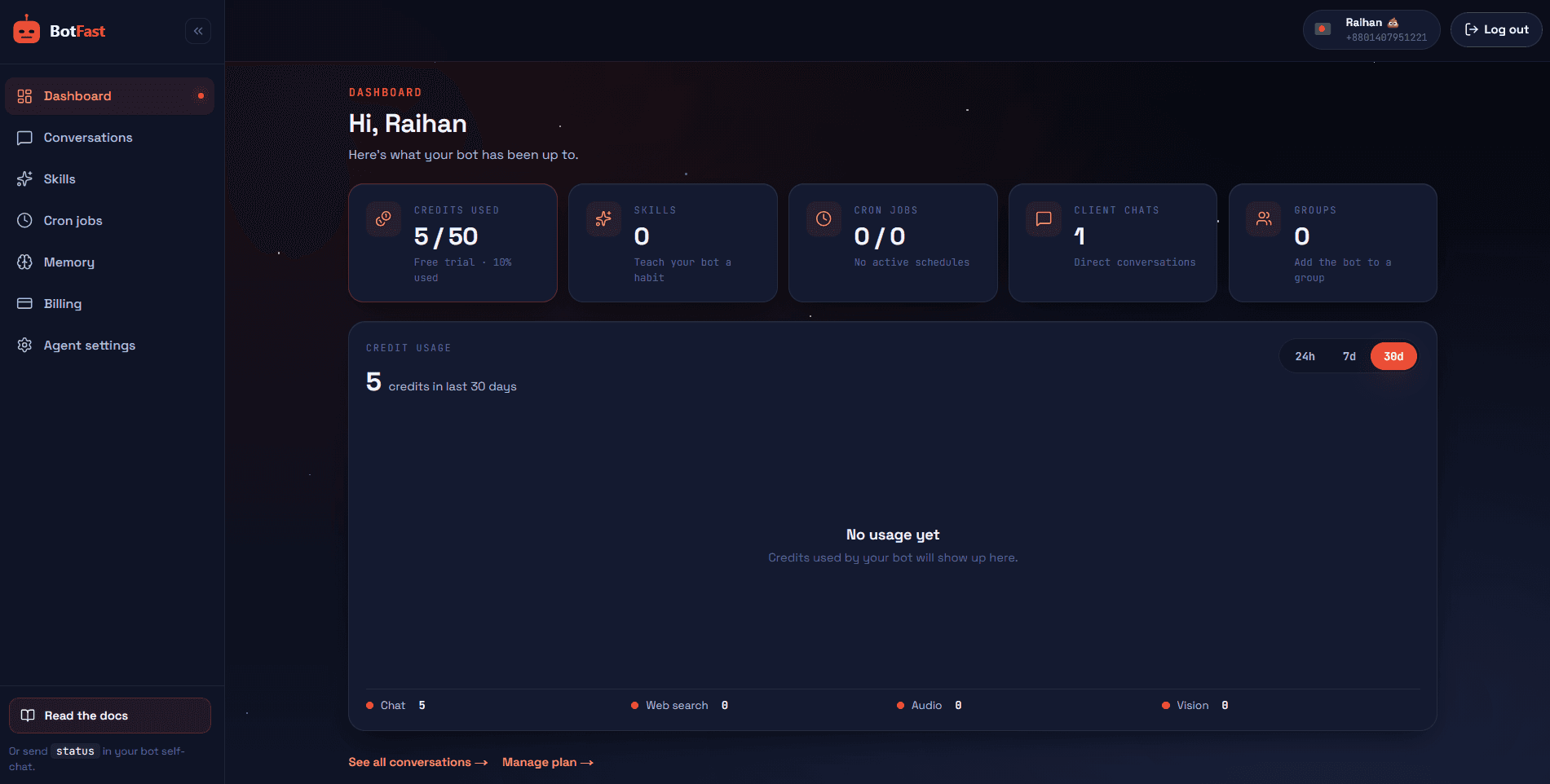
💬Conversations
See every client and group conversation in a WhatsApp-style thread view. Toggle AI replies per contact, rename contacts, and see which skills are active for each chat.
🎯Skills
Create, edit, and delete skills with a visual editor. Scope each skill to all clients, a specific contact, all groups, or one group. Set silent skills that execute quietly without sending a reply.
⏰Cron Jobs
Schedule repeating tasks and one-time reminders. Set a daily 9 am summary, a weekly report, or a one-off reminder in 10 minutes. The bot runs your prompt through its full AI and tool loop every time the job fires.
🧠Memory
Long-term memory the bot carries across every conversation. Store facts about your clients, your business, or your preferences so the bot always has context — even days later.
⚙️Agent Settings
Set your bot's persona, name, tone, and emoji. Turn global AI replies on or off. Everything your bot says is shaped by the persona you define here.
Why BotFast instead of building it yourself
Enter your number, scan one QR code, done. No server to provision, no Docker to configure, no SSL cert to manage. Self-hosting a WhatsApp bot takes 1–3 days minimum — that is before anything breaks.
WhatsApp breaks unofficial clients regularly. Reconnections, credential storage, and library updates are handled for you — not your Saturday afternoon. BotFast stays up so you do not have to.
Powered by DeepSeek V4 Pro — not keyword matching. The bot understands context, reads tone, follows nuanced skills, and gives answers that actually sound like you wrote them.
Book Calendar appointments, read Gmail, upload to Drive, update Sheets — all triggered from a WhatsApp message. Building this yourself from scratch takes weeks and costs developer time.
Global skills, per-contact skills, group skills, silent skills. The bot follows exactly the right instruction for the right person — without you needing to do anything.
50 credits to test every feature including Google integration, skills, memory, and scheduling. Most founders have a fully working bot inside the free trial period.
Real-world use cases for a WhatsApp chatbot
A chatbot is only worth building if it does real work. Here are the patterns we see most often from people running BotFast in production — each one takes under five minutes to set up with skills.
| Who | What the bot does | Skills it uses |
|---|---|---|
| Freelance designer | Replies to new leads, shares portfolio link, books a 15-min intro call | Lead intake + Google Calendar |
| Local clinic | Answers hours/location, books appointments, sends reminders 1 hour before | FAQ + booking + reminders |
| E-commerce seller | Handles "where is my order", shares tracking, captures refund details | Order status + escalation |
| Consultant | Qualifies leads with 2 questions, books a discovery call, sends prep form | Intake + scheduling |
| Tutor | Books sessions, sends a prep reminder the night before, reschedules | Booking + reminders |
| Community manager | Answers FAQs in a customer group, posts a daily summary | Group skills + cron |
These are not hypothetical — they are the exact configurations new users build inside the free trial. The combination that delivers the fastest payoff is almost always auto-reply + appointment booking + reminders. Read the deep dives: auto reply bot, appointment booking bot, and reminder bot.
Copy-paste skills library
Skills are just plain-English instructions. Here are battle-tested examples you can paste straight into your WhatsApp self-chat and tweak. Put each one in its own message.
Lead capture and qualification
When a new contact messages me, reply within 1 minute in a warm tone. Ask what they need help with and whether they want to book a 15-minute intro call. If yes, propose 2 slots from my Google Calendar later this week.Pricing and FAQs
When anyone asks about pricing, plans, or cost, reply with a one-line summary and the link https://botfast.co/pricing. Mention that there is a free trial.After-hours auto-responder
Outside 9am to 6pm my local time, tell clients I am off the clock but will reply by the next morning. Still capture their question and message me privately with a summary so I can prioritize.VIP client handling
When Ahmed messages me, greet him by name, reference that he is a monthly retainer client, and ask if he needs the usual report. Always prioritize his thread.Daily morning briefing
Every day at 9am, summarize overnight client messages, flag anything that looks urgent, and list today's Google Calendar events. Keep it under 150 words.Order status lookup
When someone asks about their order, ask for the order number, look up the row in my Orders Google Sheet, and reply with the current status and estimated delivery.Start with one or two that match your most common repeat question, then add more as you see what the bot gets asked. The full skill system (scopes, silent skills, group skills) is covered in the business automation guide.
Self-hosting vs a managed platform
If you are still weighing whether to self-host (Baileys on a VPS) or use a managed platform like BotFast, here is the honest tradeoff.
| Factor | Self-hosted (Baileys) | BotFast (managed) |
|---|---|---|
| Time to first reply | 1–3 days of dev work | Under 60 seconds |
| Monthly cash cost | $5–$20 (VPS) | $9–$99 |
| Hidden cost | Your time — maintenance, reconnects, protocol breaks | None — handled for you |
| AI quality | DIY (bring your own model + prompts) | Tuned out of the box (DeepSeek V4 Pro) |
| Google Workspace | Weeks of integration work | One OAuth tap |
| Best for | Developers who want full control | Anyone who wants it to just work |
Self-hosting is the right call if you are a backend developer who enjoys infrastructure and wants zero recurring SaaS spend. For everyone else — which is most people reading a "no coding required" guide — the managed route wins on every axis that matters. For the full cost picture, see our WhatsApp chatbot pricing breakdown.
Common mistakes to avoid
Most failed WhatsApp chatbot projects fail for the same handful of reasons. Avoid these and you are ahead of 90% of attempts:
- Using the WhatsApp Business API when you do not need to. The API requires Meta approval, template approval, and per-message fees. Unless you are sending marketing broadcasts at scale, the linked-device route is simpler, cheaper, and faster.
- Writing one giant mega-skill. A single 500-word instruction is hard for the model to follow consistently. Break it into small, focused skills — one per situation.
- No escalation path. A bot with no way to say "I do not know, let me get a human" frustrates customers. Always add an owner-notify fallback.
- Never reviewing conversations. The dashboard shows every reply. Spend five minutes a week pruning skills that produce awkward answers and the bot gets sharper fast.
- Over-automating on day one. Start with auto-reply and one FAQ skill. Watch it for a day. Then layer on booking, reminders, and group skills once you trust the baseline.
- Ignoring after-hours. A huge share of leads arrive outside business hours. An after-hours skill that captures and acknowledges them is often the single highest-ROI automation.
What else you can automate
Once your chatbot is live, the same platform handles the rest of your WhatsApp workflow. Each of these is a deeper guide if you want to go further:
- Customer support — deflect FAQs, capture details, escalate to a human.
- Group bots — answer when mentioned, run group-specific skills, post daily summaries.
- A personal AI assistant — memory, daily briefings, inbox summaries.
- A WhatsApp GPT bot — ChatGPT-class replies, file and image understanding inside chat.
- Compare chatbot tools — how BotFast stacks up against Wati, Twilio, ManyChat, and Landbot.
Frequently asked questions
Do I need to code to build a WhatsApp chatbot?
No. With BotFast you configure everything by typing in plain English — skills, personas, reminders, Google integrations — directly inside WhatsApp. Zero code at any point in the process.
Is this the same as WhatsApp Business API?
No. The official WhatsApp Business API requires Meta approval and is built for enterprises sending millions of messages. BotFast uses WhatsApp's linked-device feature — the same mechanism as WhatsApp Web — which works with any personal or WhatsApp Business number instantly, with no approval and no per-message fees.
How much does a WhatsApp chatbot cost?
BotFast's free trial gives you 500 credits — enough to test every feature including Google integration, skills, memory, and scheduling. Paid plans start at $9/month (Starter, 5,000 credits). Roughly 1,000 credits covers about 1,000 AI-processed messages. See the full pricing breakdown.
Can the bot handle multiple clients at the same time?
Yes. Each incoming message is processed independently, so simultaneous conversations from different contacts are handled in parallel with no queue or delay.
What happens when the bot does not know how to reply?
If no skill matches and AI reply is on, the bot gives a short, polite contextual answer. You can also configure it to notify you privately when unusual messages arrive so you can follow up personally.
Is my WhatsApp data safe?
Yes. Messages stay end-to-end encrypted through WhatsApp, and the bot appears as a standard linked device in your account settings — the same mechanism WhatsApp Web uses.
Can I use my existing WhatsApp number?
Yes. Use the personal or WhatsApp Business number your clients already message you on. They keep texting the same number — nothing changes on their end.
Does it work on iPhone and Android?
Yes. The linked-device feature works identically on both. You scan the QR code from WhatsApp settings on either platform.
Can the bot send voice notes or images?
The bot understands incoming voice notes (transcribed automatically) and images (read via vision). Replies are text-based and conversational, which is what works best on WhatsApp.
What if I want to stop the bot temporarily?
Say pause replies in your self-chat or toggle it from the dashboard. The bot goes silent until you turn it back on — your number stays connected the whole time.
The bottom line
Building a WhatsApp chatbot in 2026 does not have to mean spinning up a cloud VM and managing Docker containers. If you are a non-technical founder or business owner who needs faster replies and fewer interruptions, the no-code path with BotFast is the better choice for most people — and it takes under a minute to start.
The free trial at BotFast requires no credit card and gives you enough credits to test every feature, including Google Workspace integration, skills, memory, and cron scheduling.